Dictation

Talk. It writes it properly.

WisprBee is a voice keyboard that hands you finished text — punctuated, tidied, and written the way the app you're in expects. Hold a key, say what you mean, and get on with your day.

Four moves, and you'll never go back.

1

Put your cursor where the words should go.

Any app, any field.

2

Hold your key.

A soft chime, and you'll see it listening.

3

Say it however it comes out.

False starts, corrections, tangents — all fine.

4

Let go.

The finished text is already in place.

Prefer not to hold anything? Click to start, click to stop. Same result.

And if you didn't actually say anything, WisprBee tells you it heard nothing rather than inventing a sentence to fill the silence.

It writes for where the words are going

The same thought, dressed for the room.

WisprBee knows what you're writing into before you start talking, so it never gives you a work email in a group chat or a chatty one-liner in a support ticket.

You say

hey can we push the sync to tomorrow at 3 — actually 4, and I'll bring the numbers

Slack

Hey — can we push the sync to tomorrow at 4? I'll bring the numbers.

You said it once.

Four keys, four jobs.

Finished text at your cursor, written for the app you're in.

Listening…

Every key is yours to choose — set them to whatever your hands already reach for, or switch the ones you don't want off entirely.

Everything WisprBee does

One key. Every kind of writing, done right.

Context Engine

The instant you press your key, WisprBee detects the app in front of you and shapes your words for it — casual in chat, structured in email, engineered in coding tools, punchy on LinkedIn. No mode to pick, no dropdown.

Why it matters: Every other voice tool gives you one output and leaves the “make it fit” work to you. WisprBee does that work automatically, so what lands is already right for the room.

8 built-in destinations out of the box, matched by the app and even the website you're on.
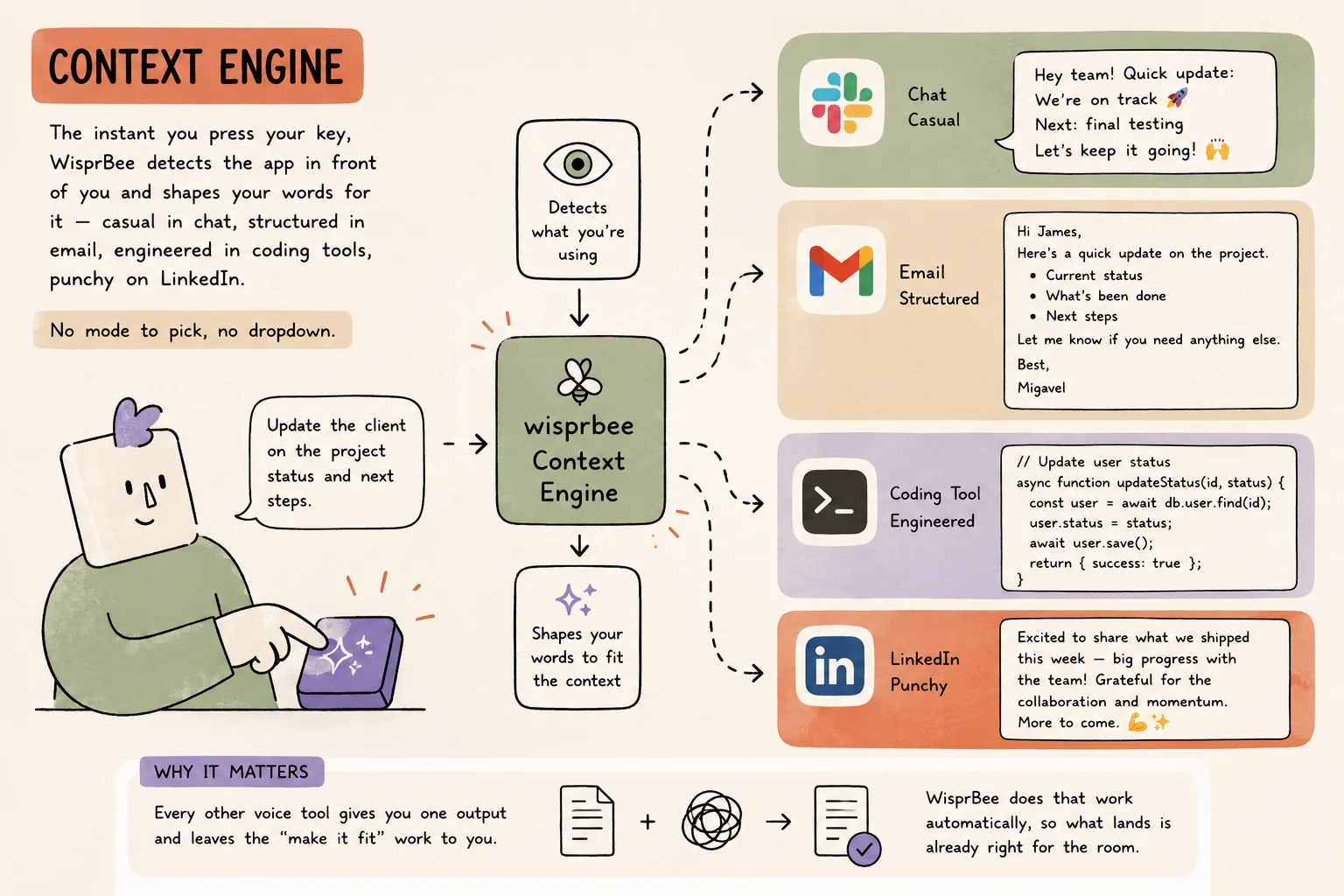
How Context Engine works in WisprBee — The app picks the tone — you never do.

Notetaker

Captures your microphone and your Mac's system audio together, so every voice on a call is transcribed — while running as an app on your machine rather than as a participant in the meeting. No bot in the attendee list, and no meeting-platform integration to set up. The same Notetaker takes long-form voice notes when there's no call at all.

Why it matters: Every other AI notetaker announces itself by joining the meeting. This one doesn't join, so it works on any platform — Zoom, Meet, Teams, or a phone on speaker — with nothing for anyone else to approve.

Bot-free capture on every tier, the free one included.

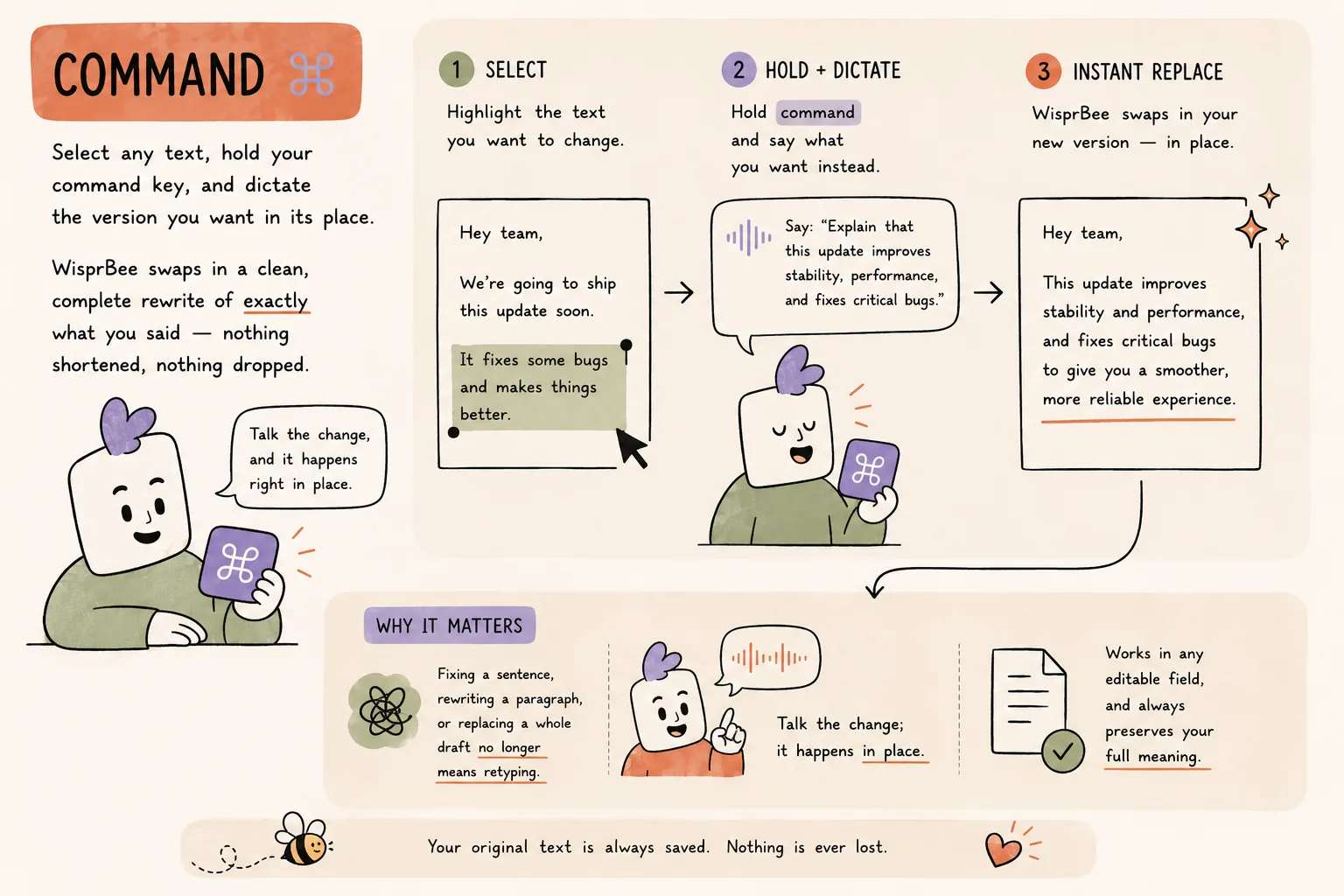
Command

Select any text, hold your command key, and dictate the version you want in its place. WisprBee swaps in a clean, complete rewrite of exactly what you said — nothing shortened, nothing dropped.

Why it matters: Fixing a sentence, rewriting a paragraph, or replacing a whole draft no longer means retyping. Talk the change; it happens in place.

Works in any editable field, and always preserves your full meaning.
How Command works in WisprBee — Edit and replace by voice.

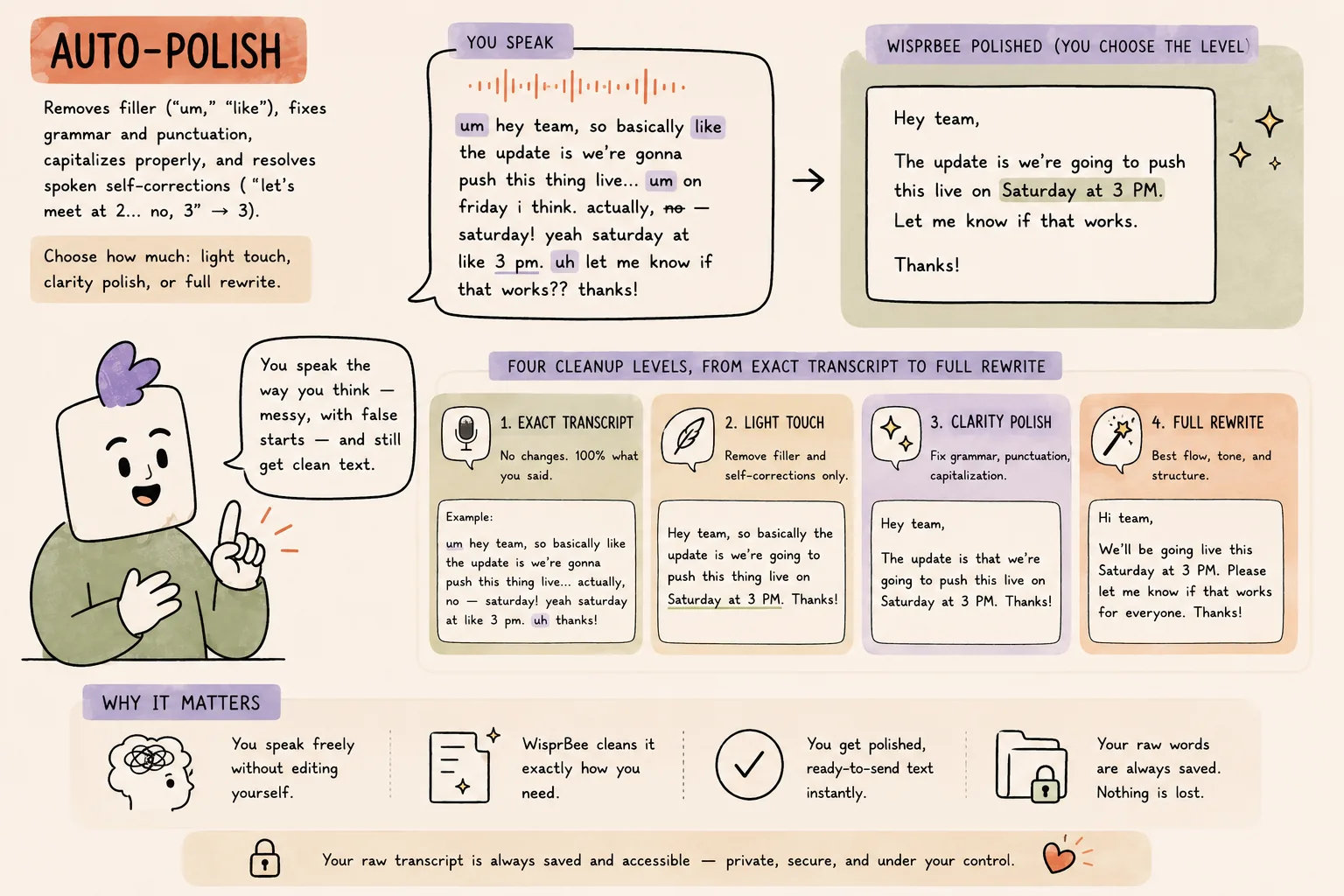
Auto-Polish

Removes filler (“um,” “like”), fixes grammar and punctuation, capitalizes properly, and resolves spoken self-corrections (“Tuesday — no, Thursday” → Thursday). Choose how much: light touch, clarity polish, or full rewrite.

Why it matters: You dictate the way you think — messy, doubling back — and clean text still comes out. And your raw words are always saved, so nothing is ever lost.

Four cleanup levels, from exact transcript to full rewrite.
How Auto-Polish works in WisprBee — Finished text, not a transcript.

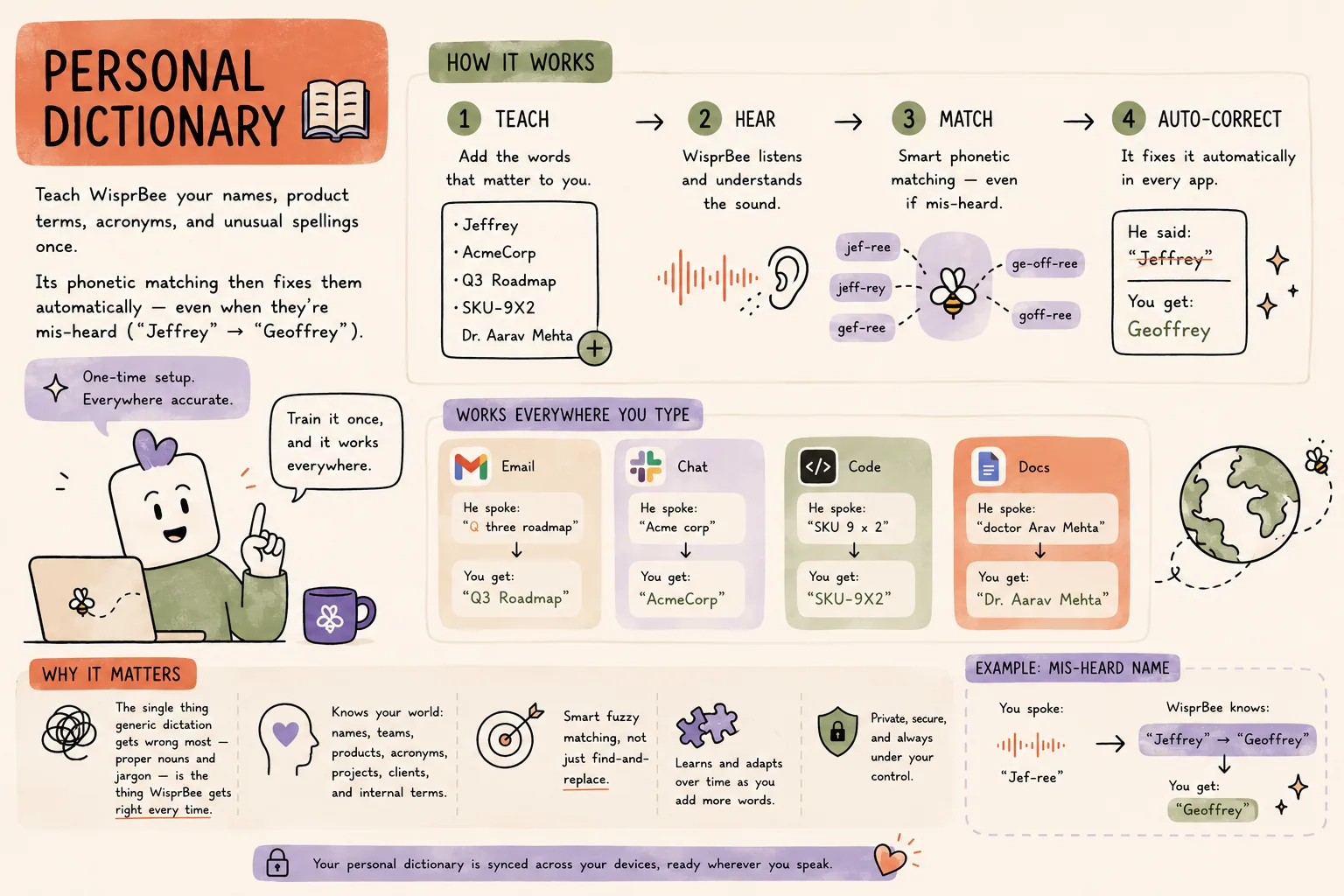
Personal Dictionary

Teach WisprBee your names, product terms, acronyms, and unusual spellings once. Its phonetic matching then fixes them automatically — even when they're mis-heard (“Jeffrey” → “Geoffrey”).

Why it matters: The single thing generic dictation gets wrong most — proper nouns and jargon — is the thing WisprBee gets right every time.

Smart fuzzy matching, not just find-and-replace.
How Personal Dictionary works in WisprBee — Your names, always right.

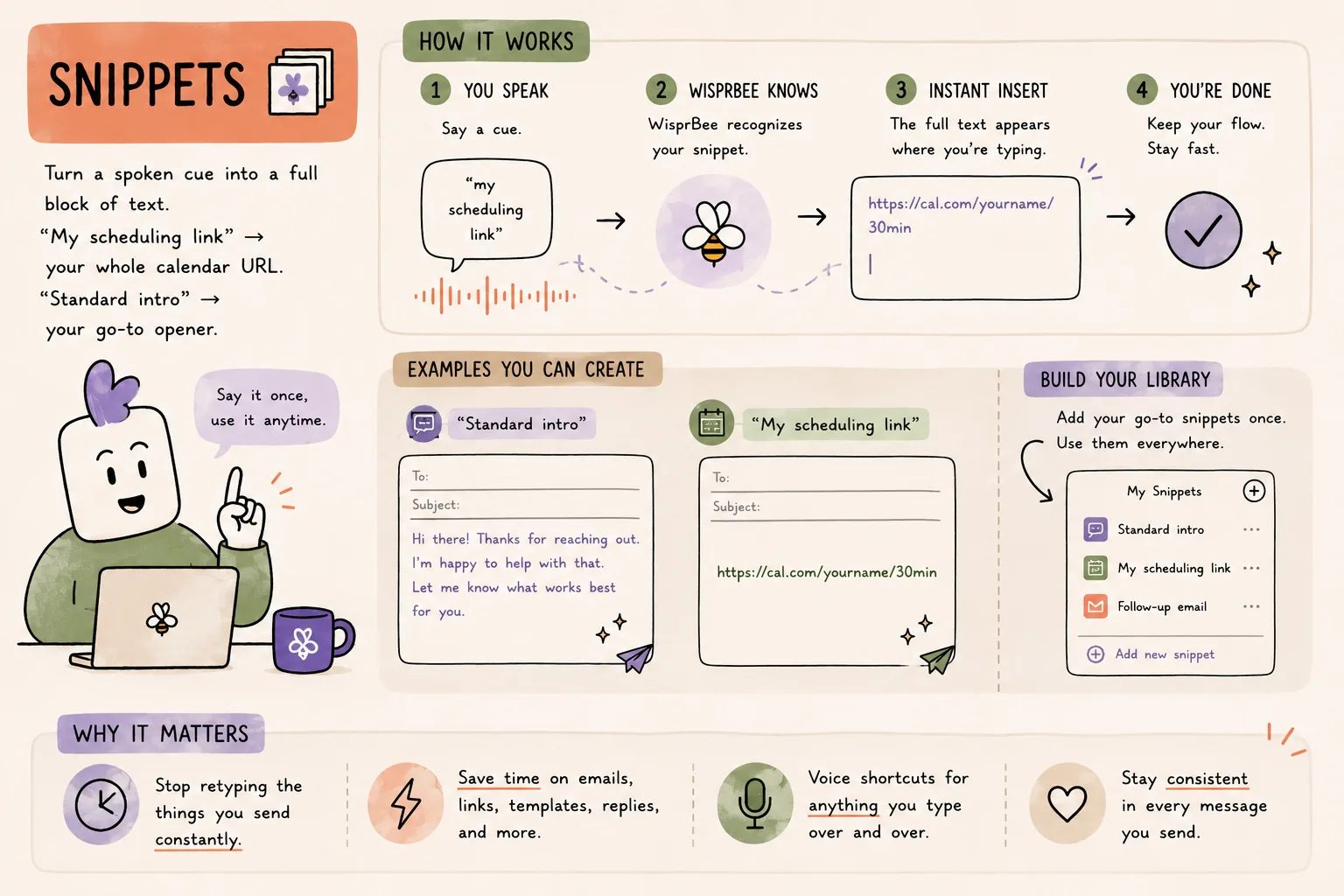
Snippets

Turn a spoken cue into a whole block of text. “My scheduling link” → your whole calendar URL. “Standard intro” → your go-to opener.

Why it matters: Stop retyping the things you send constantly.

Voice shortcuts for anything you type over and over.
How Snippets works in WisprBee — Say a little, paste a lot.

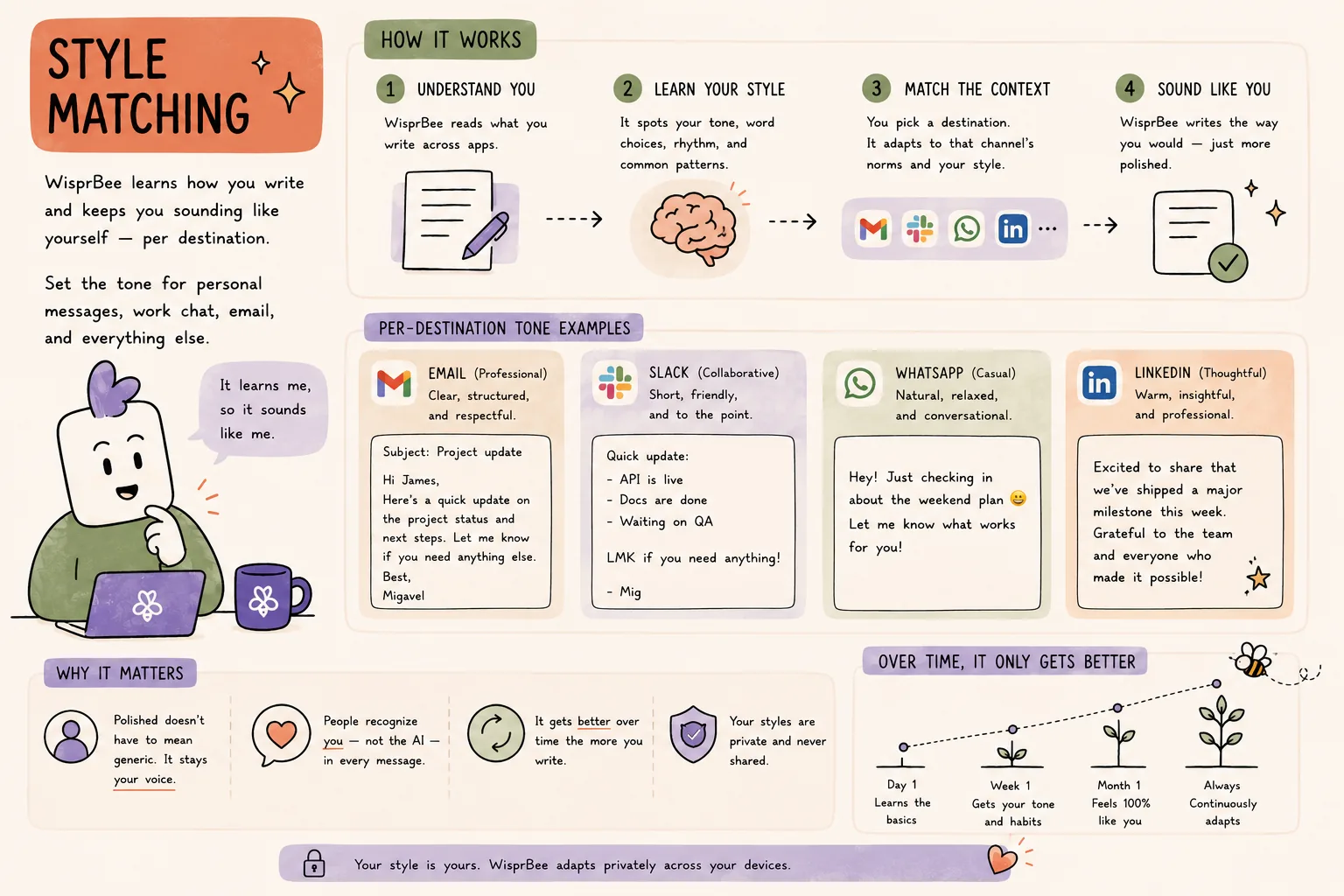
Style Matching

WisprBee learns how you write and keeps you sounding like yourself — per destination. Set the tone for personal messages, work chat, email, and everything else.

Why it matters: Polished doesn't have to mean generic. It stays your voice.

Per-destination tone that adapts over time.
How Style Matching works in WisprBee — Sound like you.

Languages

Dictate in 100 languages — let WisprBee auto-detect what you're speaking, or pick your language for the sharpest accuracy. Then choose the language your text comes out in, English by default. Speak Spanish, send English.

Why it matters: Perfect for multilingual teams and second-language speakers who think in one language and write in another.

100 languages, auto-detect or pick your own.

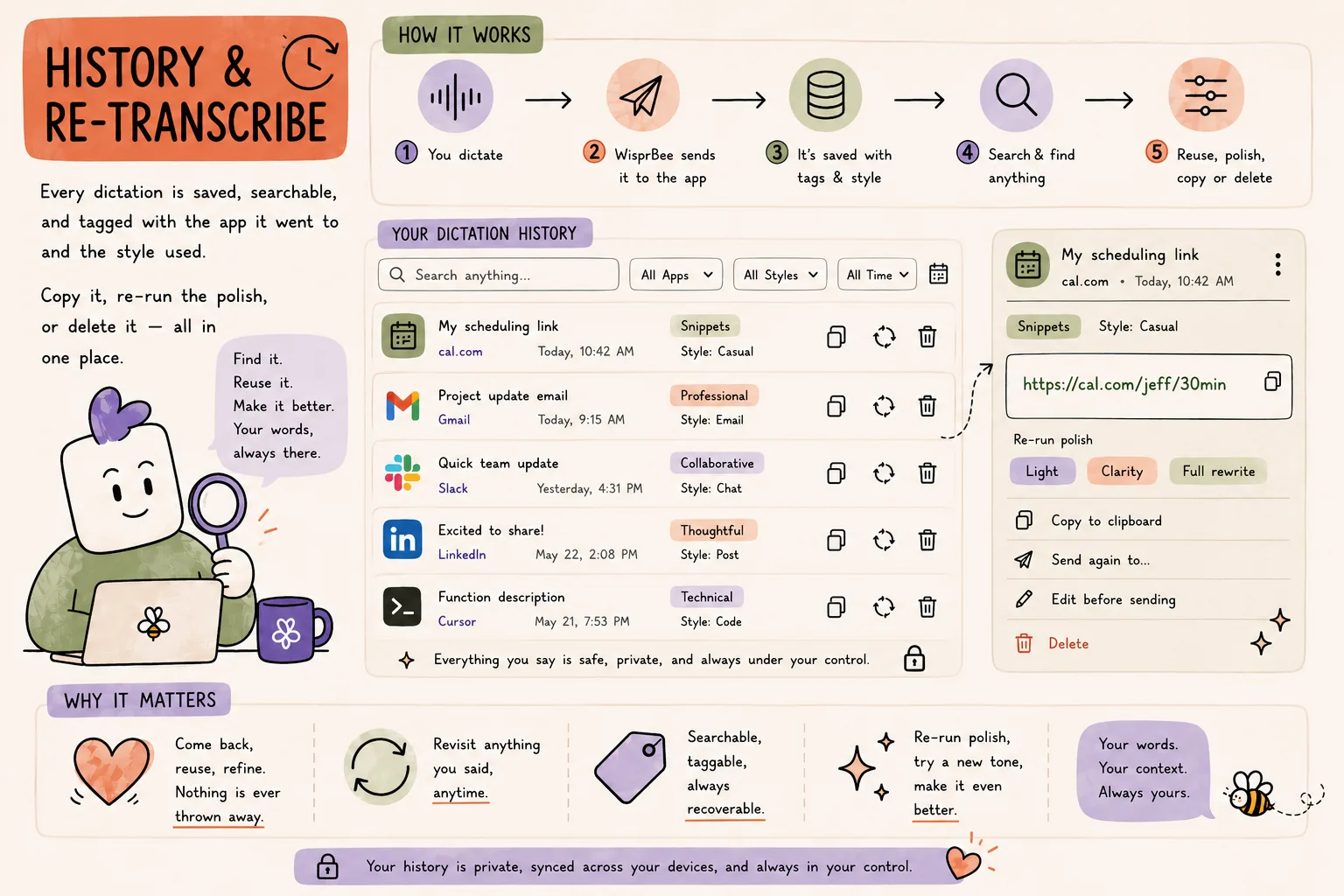
History & re-transcribe

Every dictation is saved, searchable, and tagged with the app it went to and the style used. Copy it, re-run the polish, or delete it — all in one place.

Why it matters: Come back, reuse, refine. Nothing is ever thrown away.

Searchable, taggable, always recoverable.
How History & re-transcribe works in WisprBee — Your words are never a one-shot.

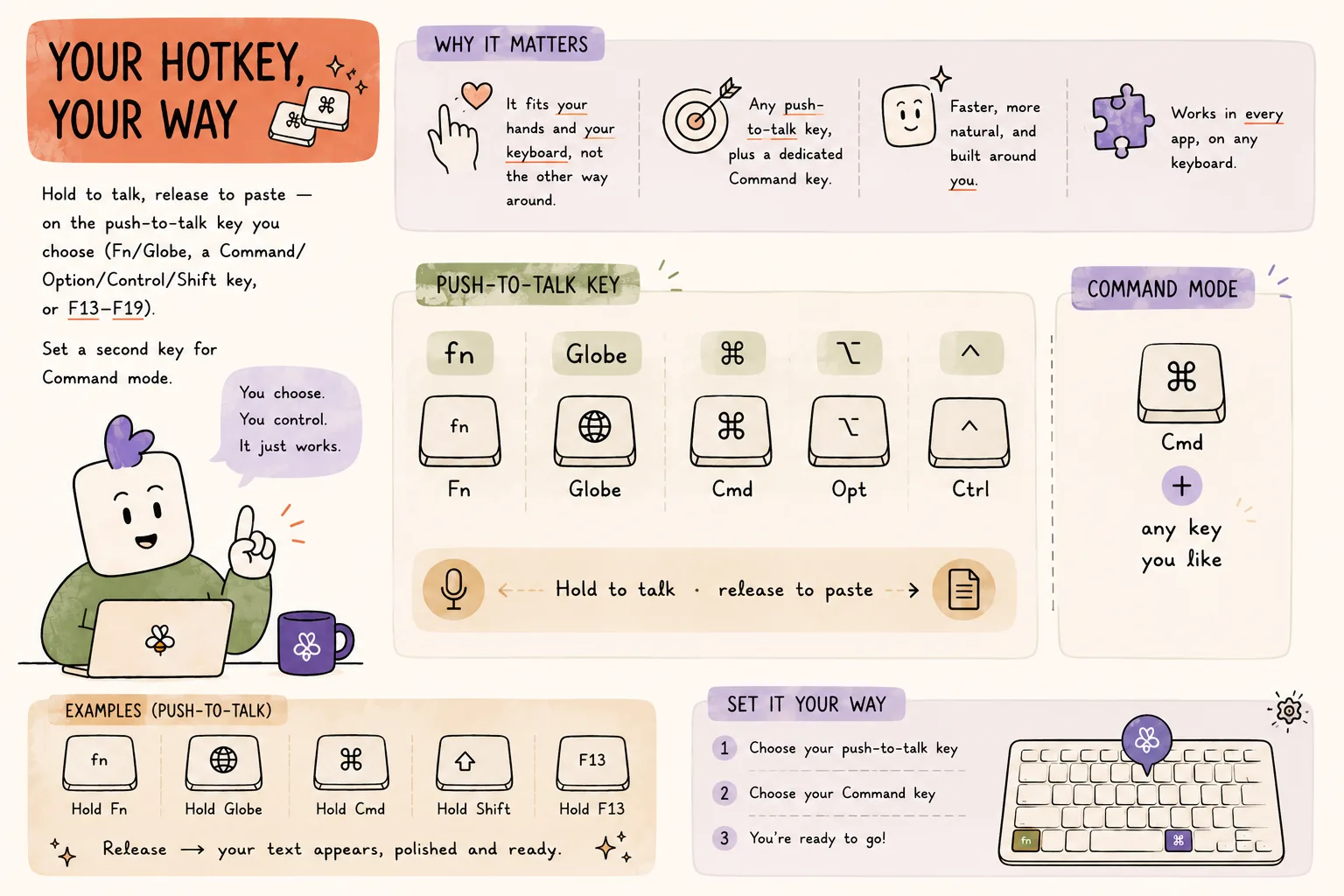
Your hotkey, your way

Hold to talk, release to paste — on the push-to-talk key you choose (Fn/Globe, a Command/Option/Control/Shift key, or F13–F19). Set a second key for Command mode.

Why it matters: It fits your hands and your keyboard, not the other way around.

Any push-to-talk key, plus a dedicated Command key.
How Your hotkey, your way works in WisprBee — It fits your hands.

Ready to write at the pace you think?

Download free

You stay in charge

It's your writing. You get the final say.

See what changed.

A before-and-after of every edit it made — what came out, what went in.

Undo.

One keystroke, and your own words are back exactly as you said them.

Another take.

One button rewrites it, in case the first version wasn't the one.

Tell it.

A thumbs up or down on any result, so it learns what you like.

Nothing is ever lost.

Whatever happens, what you actually said is kept.

Your clipboard is safe.

Whatever you had copied is still there afterwards.

It gets your words right

Your names. Your jargon. First time.

It watches the fixes you make anyway.

Type over a mis-heard name and it keeps the correction — with an undo, in case you'd rather it didn't.

It leans on what's already in front of you.

The names on your screen are usually the names you're about to say, so it's ready for them before you say them.

And when you want to be deliberate: keep your own list of words and corrections, star the ones that matter, and share them with your team so nobody re-teaches the same name twice.

Snippets

Say the name. Get the whole thing.

Save the text you send constantly — a link, an intro, a standard reply, a prompt — and give it a name. Then just say the name mid-sentence and the full text appears. Yours, or shared with the team so everyone sends the same thing.

Saved as

my scheduling link

You say

here's my scheduling link, grab whatever suits you

It lands

Style

Your tone, set once, per kind of writing.

Could we move our call to Thursday afternoon?

And a dial for how much cleanup you want.

Leave it alone

Exactly what you said.

Tidy it

Filler out, grammar fixed.

Tighten it

Clearer, shorter, better.

Rewrite it

Properly polished prose.

Let it choose

A clean thought passes through; a messy one gets help.

Languages

100 languages. Speak the one you think in.

Dictate in the language you think in — WisprBee works out which one you're speaking, or set it and forget it. Then choose what comes out, per destination: your own language for family, English for work chat and email, automatically.

100

languages in. Any language out.

Where it works

If you can click into it, you can talk into it.

WisprBee isn't a plugin for one app or an extension for one browser. It works in every text field on your Mac — messages, mail, documents, tickets, search boxes, forms, code editors, AI tools, the little box where you name a file.

Who it's for

Founders and managers

the twenty messages, four emails and one ticket you owe people, done between meetings.

Writers and creators

draft at the speed you think, then edit instead of typing.

Support and success teams

warm, correct replies all day without the wrist ache.

Anyone writing in a second language

think out loud, send perfect English.

Anyone whose hands hurt

the keyboard becomes optional.

Frequently asked questions

Does it work offline?

No — WisprBee needs an internet connection to do its best work. If your connection drops mid-sentence you still get your words, tidied up as best it can, and it tells you that's what happened.

What if I don't like the polished version?

Undo gives you your own words back instantly, or one button produces a different take.

Can I turn the polishing off completely?

Yes. Set it to leave your words exactly as spoken.

Can I change the key?

Yes — pick whatever your hands already reach for, and switch off the ones you don't use.

Does it need a plugin for each app?

No. It works everywhere on your Mac out of the box.

Will it get my accent?

It's built for the way people actually speak, accents and all, and it gets better at your particular words as you use it.

What does it do with my microphone?

It listens only while you're holding the key. And if you plug in headphones or a headset, it asks before switching to them.

Talk. It writes it properly.